
Apple’s New Zero-Interest Klarna Lease
Buying top-tier technology outright is becoming increasingly difficult for the average consumer.
After raising iPad and Mac prices amid industry-wide memory chip shortages that have driven up hardware costs, Apple is giving buyers a new way to spread out the expense.
To ease this financial burden, Apple teamed up with Klarna to launch a brand-new US-based financing program on July 28.
The Core Solution: The new Apple Upgrade Klarna lease program replaces discontinued options by functioning as a true lease rather than an installment loan. It allows you to finance iPhones, Apple Watches, iPads, and Macs with ultimate flexibility.
If you are researching how to finance your next tech purchase, here’s a breakdown of the terms, the 12-month upgrade options, and the damage fees worth understanding.
What is the Apple Upgrade Klarna Lease Program?
This initiative completely replaces the old iPhone Upgrade Program and iPhone Payments, which have officially been discontinued.
Available online, in the Apple Store app, and in physical retail stores, the program drastically expands hardware eligibility.
You can now lease far more than just smartphones, leasing multiple devices to build out a full tech ecosystem.
Zero Interest, But Strict Exclusions
The biggest financial advantage of this program is the absolute lack of standard borrowing costs.
Klarna isn’t charging a financing fee, so a $1,099 iPhone can be leased and then bought for $1,099 with no extra cost beyond taxes.
However, note that entry-level hardware is strictly excluded from the program. Additionally, business accounts and educational institution purchases are not eligible for this consumer-focused structure.
Lease Durations & Ecosystem Bundling
The program is structured around true leasing durations, and you choose your term length within the options available for each category of hardware.
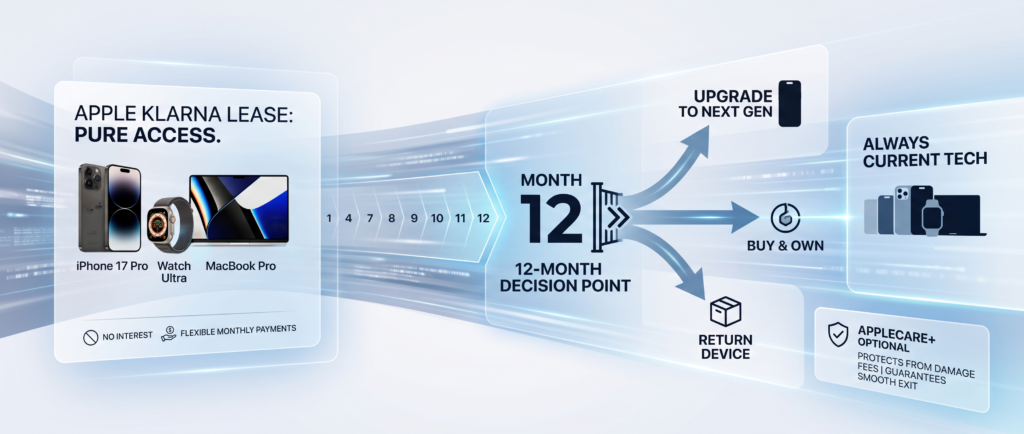
Because it is a true lease, at the end of the term you can upgrade to the latest generation, buy the device with a one-time payment, or simply return it and exit.
One major perk is building out your ecosystem.
You can lease multiple devices—like an iPhone, Apple Watch, and MacBook—to assemble a full Apple setup. Note that each product is applied for and leased separately, so every device carries its own monthly payment rather than combining into a single bundled amount.
Even so, spreading each device across its own lease lets you get a full tech setup without paying thousands of dollars upfront. Apple does not allow a down payment on these leases.
The Critical 12-Month Milestone
For iPhone and Apple Watch users on a 24-month lease, the 12-month mark is typically the point where you become eligible to upgrade—mirroring the cadence of the old iPhone Upgrade Program.
As an illustrative example, a $799 iPhone 17 spread over 24 months would land at roughly $33 per month (actual rates vary and start lower with a trade-in). Once you hit that 12-month milestone, you generally have three directions to consider—though the exact fees and buyout math are defined in your individual lease agreement, not in Apple’s public pricing.
- Return It: At the end of your term you can hand the device back and exit. This isn’t a strings-free “walk away with half paid,” though—returning mid-term can involve purchase or termination fees, and you leave empty-handed, missing the equity you’d have gained by selling a phone you owned.
- Upgrade: You can trade the device in for the newest model. Upgrading at the end of the term carries no upgrade fee, but upgrading early can cost up to your remaining lease payments—so it’s best for annual upgraders timing it right to skip the hassle of private selling.
- Buy Outright: You can pay the purchase option fee to own the device entirely. Because Apple and Klarna describe the lease payments as zero-interest, buying at term end effectively behaves like interest-free financing—though the exact buyout formula is set in your lease contract rather than published.
Financial Takeaway: Based on Apple’s and Klarna’s description of zero-interest lease payments plus a purchase option at term end, buying the device out effectively behaves like interest-free financing—just confirm the exact figures in your lease agreement first.
The Danger of Damages and Hidden Fees
Damage is where a lease bites differently than a loan. The short version: the payments don’t change, but the exit does.
A major shift from the past is that AppleCare+ is optional and not included in the lease price. The old iPhone Upgrade Program always bundled it in by default.
Klarna’s Assessment Rules
While the lease is running, nothing happens automatically — you keep making the same monthly payment whether the device works or not.
At return or upgrade time is when it’s assessed, and the device has to be returned in good working condition.
If you don’t have AppleCare coverage and the device is damaged, Klarna charges a one-time damage fee. Without AppleCare+, the full cost of the assessed damage has to be paid; with it, you pay the applicable service fee instead.
- Water Damage: This is specifically the case that makes leasing expensive without coverage, as it isn’t a warranty item and often requires a whole-unit replacement.
- Lost or Stolen Devices: If lost without AppleCare+ with Theft and Loss, you keep paying monthly until you either pay the termination fee or buy it outright. The same logic applies to a bricked device.
Three Practical Outs for a Damaged Device
If you reach the end of your lease and realize your device is heavily damaged, you do have options.
You are responsible for the physical condition of the devices, and returning a cracked or heavily damaged item will trigger penalty fees.
There are generally three ways people handle a damaged device at the end of a lease:
- Repair Before Return: You can repair the device back to good working condition before returning it to avoid the damage fee — worth pricing against whatever the fee would be.
- Buy It Instead: The purchase option fee equals the full price at lease signing minus the payments you’ve already made and any remaining trade-in credits. If you own it, there’s no return inspection.
- The Grace Period: You have up to 60 days after enrolling in Apple Upgrade to add AppleCare coverage, so if you skipped it at checkout there’s a window to reconsider.
Read The Fine Print: Klarna’s lease agreement is issued at application rather than published, so exact damage amounts and some penalty details live in that document—not on Apple’s or Klarna’s public webpages. That’s the binding paperwork to read carefully at checkout.
Furthermore, customers may incur substantial fees for terminating a lease before the end of the initial term. Klarna will automatically terminate leases after three months of missed payments.
Frequently Asked Questions
Does the Apple Upgrade program charge interest?
No. Klarna isn’t charging a financing fee, meaning you pay zero interest. A $1,099 device simply costs $1,099 plus applicable taxes if you buy it out.
Is AppleCare+ required for the Klarna lease?
Unlike older programs, AppleCare+ is completely optional and not included in the standard lease price. However, users have up to 60 days after enrolling to add the coverage to protect against harsh damage fees.
Can I upgrade my iPhone every year?
Yes. Once you have made 12 months of payments on an iPhone or Apple Watch lease, you hit a milestone that allows you to trade in the device and upgrade to the newest model.
Key Points to Keep in Mind
The Apple and Klarna partnership adds a new financing option, but it comes with terms and conditions that are worth reviewing. Here are the main points covered above:
- Ecosystem leasing: Multiple devices can be leased, but each is applied for and billed separately rather than as one combined payment.
- The 12-month point: For iPhone and Apple Watch, upgrade eligibility typically begins around 12 months; early upgrades and mid-term exits can involve additional fees defined in the lease.
- AppleCare+ coverage: It’s optional and not bundled into the lease price, and can generally be added within 60 days; without it, damage fees may apply at return.
Whether leasing or buying outright makes more sense depends on individual circumstances, such as how often someone upgrades and how long they keep their devices. The full terms, fees, and eligibility requirements are set out in Apple’s and Klarna’s official documentation and the individual lease agreement.
This article is for general informational purposes only and does not constitute financial, legal, or purchasing advice. Program terms, pricing, and availability may change; verify all details with Apple and Klarna before making any decision.
