
What is AI Staging or Virtual Staging and How Does It Work?
The Ultimate Guide to AI Virtual Staging for Real Estate
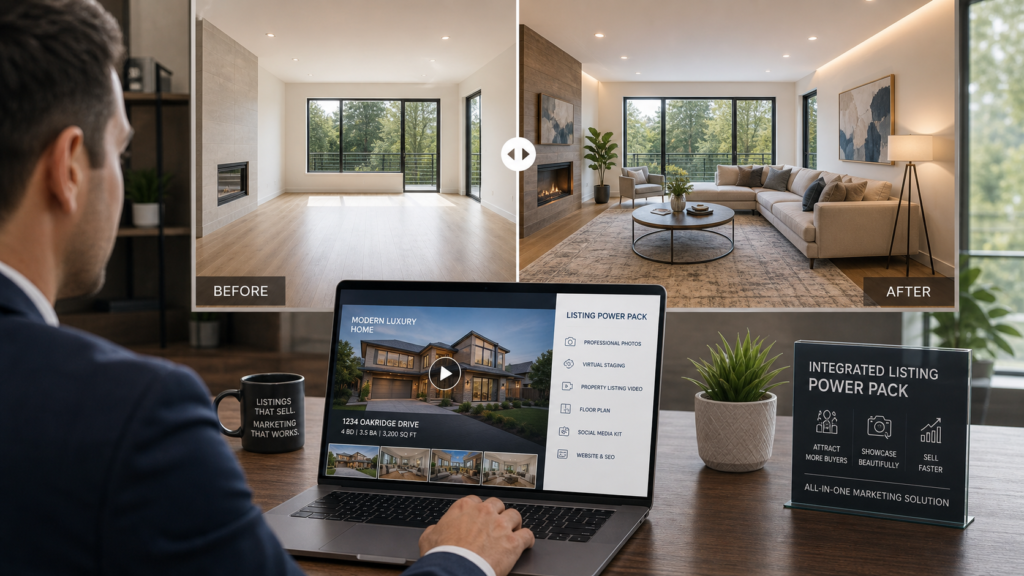
AI virtual staging (also called virtual home staging or AI home staging) uses artificial intelligence models to automatically add photorealistic furniture and décor to property photos. By analyzing a room’s geometry and lighting, these tools can composite hyper-realistic interiors in seconds—allowing buyers to visualize a lived-in space without the high costs of physical staging.
What Is AI Virtual Staging?
AI virtual staging is a technology that digitally furnishes indoor spaces using artificial intelligence trained on millions of interior design images. Instead of renting physical furniture or manually placing 3D models in editing software, an AI virtual staging software system automatically creates photorealistic staged interiors that match a room’s exact proportions, layout, and lighting.
In real estate, agents and photographers upload photos of empty or cluttered spaces and instantly receive staged versions ready for MLS listings and marketing campaigns. This approach provides a faster, lower-cost alternative to both physical staging and traditional designer-led virtual rendering.
Why AI Virtual Staging Matters for Real Estate
Empty or poorly furnished rooms often feel cold, uninviting, and difficult to visualize. This frequently leads to fewer clicks, lower attendance at open houses, and more days on market.
Integrating AI virtual staging for real estate solves this issue by showcasing the true potential of a property:
- Demonstrates living room functionality and flow.
- Clarifies bedroom layouts and sizing.
- Helps buyers visualize how small or awkward spaces can feel comfortable and functional.
When comparing virtual staging vs physical staging, traditional physical staging can easily cost hundreds or thousands of dollars per room and take days to coordinate and install. AI tools, on the other hand, can furnish rooms in under a minute at a fraction of the cost—opening up professional-grade presentation to solo agents, small teams, and budget-conscious sellers.
How Does AI Virtual Staging Work? (Step-by-Step)
If you are wondering how does AI virtual staging work, the workflow generally follows five straightforward steps:
Step 1: Upload a High-Quality Room Photo
The process starts with a clear, well-lit photo of an empty or lightly furnished room (living room, primary bedroom, kitchen, office, etc.). Wide-angle, landscape-orientation photos with balanced natural daylight yield the best results.
Step 2: Room Understanding and Geometry Analysis
Computer vision models analyze the room’s architecture—mapping walls, floors, ceiling heights, doors, and windows—while detecting features like fireplaces or exposed beams. This “scene understanding” ensures generated furniture sits flat on the floor and aligns with walls rather than looking floating or distorted.
Step 3: Detect Stageable Space and Apply Style
The system identifies open floor areas and blank surfaces suitable for staging. You can select a target design aesthetic—such as modern, Scandinavian, farmhouse, minimalist, or luxury—to match your prospective buyer demographic.
Step 4: Generate Furniture and Composite It
Generative AI models (often powered by diffusion techniques) create context-appropriate furniture, décor, rugs, and lighting. The software composites these elements directly into the image while matching:
- Perspective: Items sit naturally within the 3D space.
- Scale: Furniture remains proportionate to room dimensions.
- Lighting & Shadows: Reflections and shadows blend seamlessly with existing light sources.
Step 5: Review, Export, and Publish
Once generated, you can refine styles or export high-resolution, watermark-free images. When publishing, always ensure you follow local MLS virtual staging rules, which typically require clear disclosure of digital alterations alongside the original, unaltered photo for reference.
Answering Common Staging Questions
How do real estate agents use AI virtual staging to sell homes faster?
Agents leverage staged photos as hero images and thumbnails on property portals to instantly boost click-through rates. Staged visuals capture emotional interest early, driving more online engagement and in-person tour requests.
What is the best way to stage empty rooms with AI?
Start with high-resolution, well-lit photographs. Choose cohesive interior design styles tailored to the target buyer profile (e.g., sleek modern for a downtown condo, warm transitional for a suburban home) and avoid over-cluttering the space.
How does AI virtual staging compare to traditional home staging in cost and speed?
Traditional physical staging costs thousands of dollars and takes days or weeks to execute. AI virtual staging takes seconds per image, costs a fraction of the price, and eliminates physical logistics entirely while delivering comparable online visual impact.
How to Power Your Listings with an AI Real Estate Marketing Stack
To get the highest return on your marketing, staging should be integrated into a broader, full-funnel strategy:
- Capture Listing-Ready Photos: Shoot straight wide-angle angles with balanced natural lighting to give the AI a clean canvas.
- Define Your Aesthetic: Tailor staging themes directly to your ideal target buyer demographic.
- Combine Staging with Video and Copy: Maximize engagement by pairing virtual staging with a dynamic real estate listing video and persuasive property descriptions.
Streamline Your Workflow with OneVideoPro
If managing multiple platforms feels overwhelming, the OneVideoPro Real Estate Listing Power Pack offers an all-in-one solution. Instead of juggling separate vendors for staging, video production, and copywriting, you simply send in your photos and receive:
- AI virtual staging for empty or key rooms.
- A scroll-stopping real estate listing video showcase.
- A buyer-focused description engineered for MLS and social channels.
- Full review by human editors for quality control.
This “video copilot” approach allows agents to build a complete real estate listing power pack instantly, saving hours of administrative work.
Deployment Strategy: MLS, Portals, and Social Media
Once your digital assets are ready, deploy them across channels for maximum reach:
- MLS: Upload staged images alongside original photos with clear digital staging disclosures.
- Portals: Use virtually staged rooms as lead thumbnail images on sites like Zillow or Realtor.com to optimize click-through rates.
- Social Platforms: Feature short clips of the listing video and side-by-side “before and after” staging comparisons on Instagram, Facebook, and YouTube Shorts.
Key Takeaways
- Quality In, Quality Out: Always start with strong, well-lit photography.
- Match Style to Buyer: Choose design aesthetics that appeal directly to your target market.
- Stay Compliant: Adhere strictly to MLS virtual staging rules by disclosing digital modifications.
- Leverage Full-Stack Marketing: Combine staged stills with video and professional copy via comprehensive tools like the OneVideoPro Power Pack to maximize buyer conversions.
